
The flagship
LedgerLine Multi-Entity
One of the most powerful ways in Australia to run up to 10 businesses from a single spreadsheet. One ABN, one combined BAS, no monthly subscription.
What it is
A complete system for several businesses under one ABN
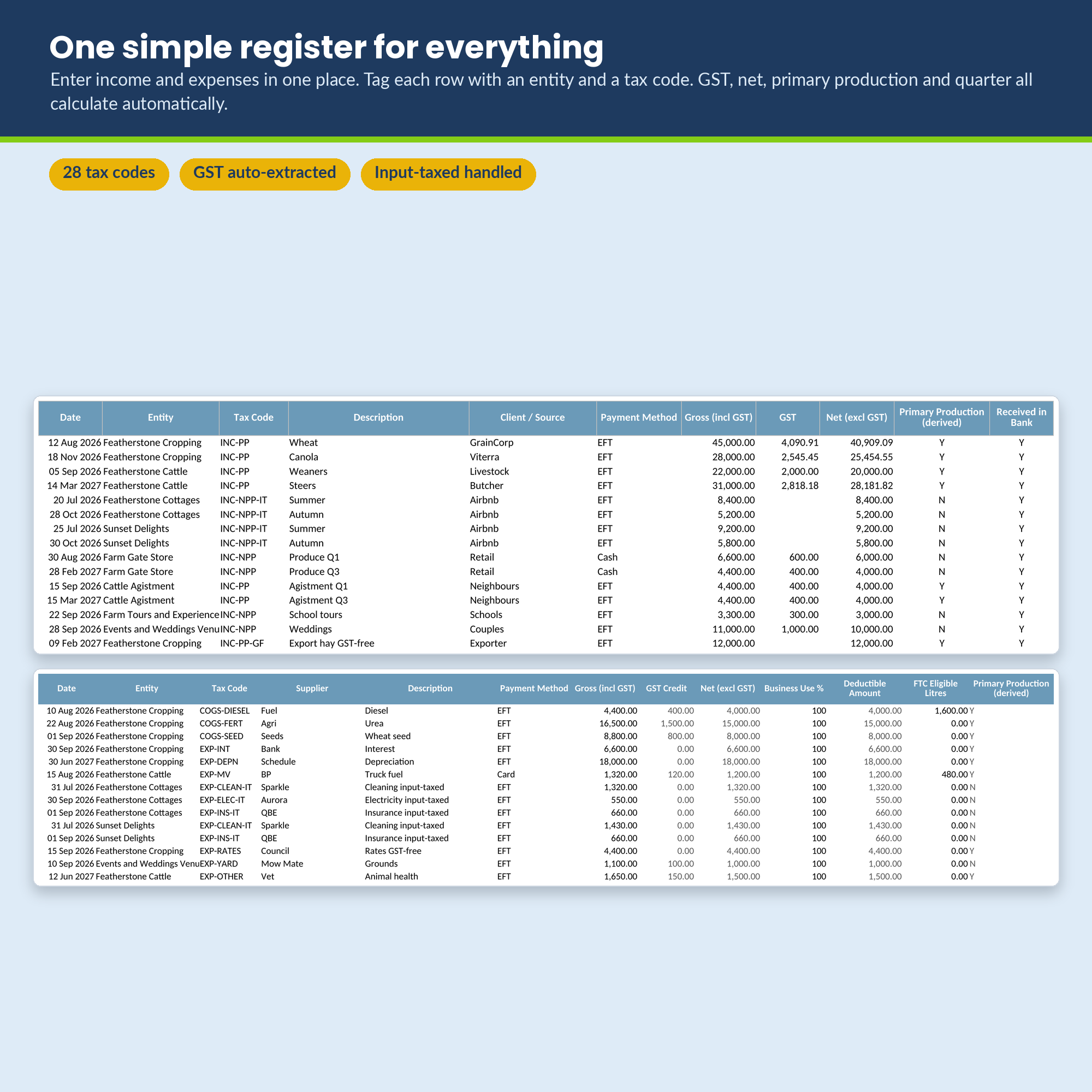
LedgerLine Multi-Entity is a complete bookkeeping system for people who run more than one business under the same ABN: a farm with a few income streams, a family group with rentals and a trade, a sole trader juggling several ventures. Record income and expenses once, tag each line to a business, and the workbook does the rest.
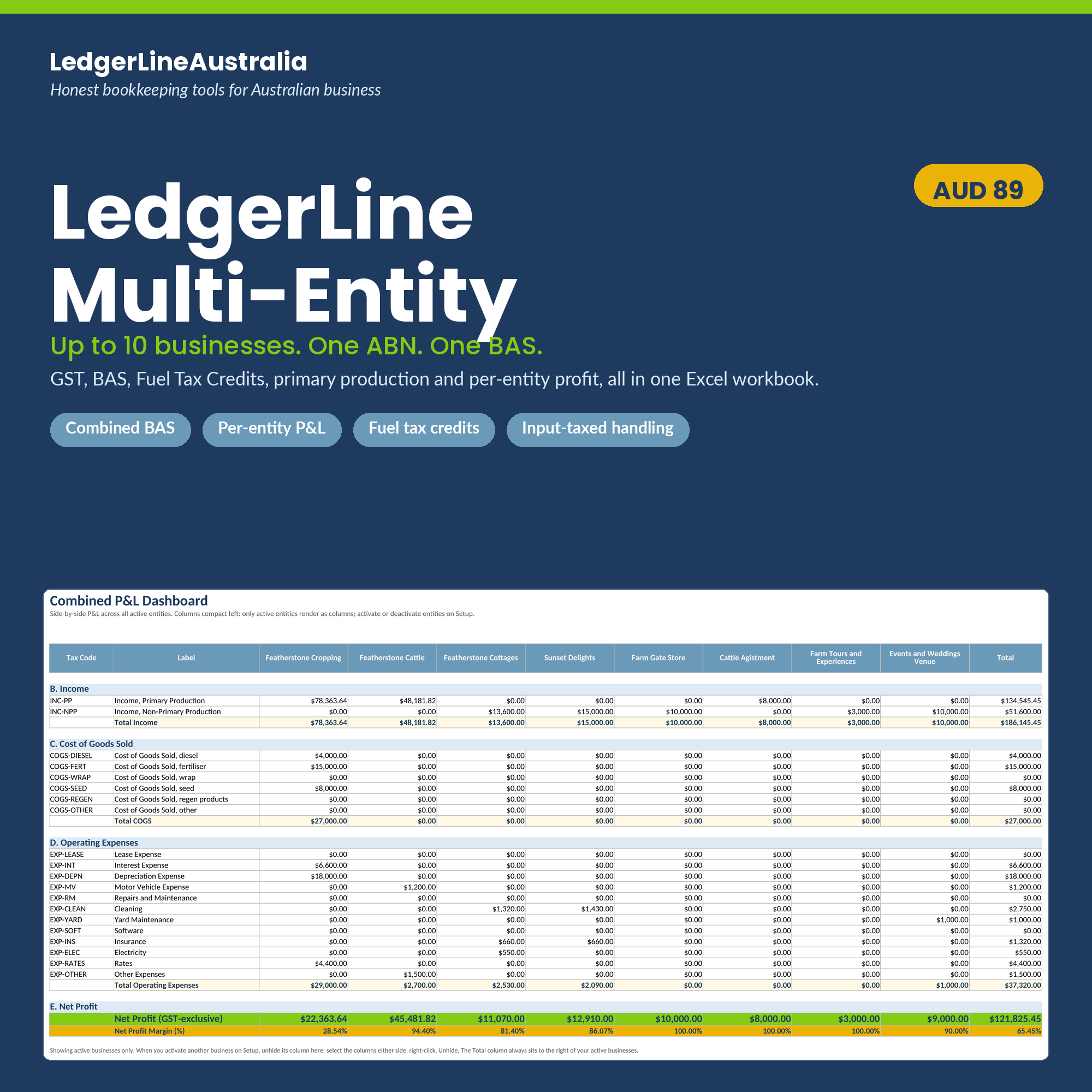
One income register, one expense register, and it splits everything out by entity automatically. One BAS to lodge. Per-entity and side-by-side profit dashboards, fuel tax credits, the primary production split your partnership return needs, and live charts that update as you type. Every formula is ATO aligned.
Best of all it is a one-off purchase, not another monthly subscription. You own it outright, with no ongoing fees and no per-entity charges, a fraction of what you would pay over a year for MYOB or Xero. Every July we email you a free ATO rate update so your figures stay current.
What is new in the latest update
The current release is v2.2.1, QA-tested in real Excel with a full recalculation and zero error cells.
- ✓Fuel tax credit rates are now locked to dates, so a rate can never be entered against the wrong row by mistake. That removes a subtle way fuel tax credits could be under-claimed.
- ✓The first fuel tax credit rate row now dates itself automatically to 1 July of your chosen financial year.
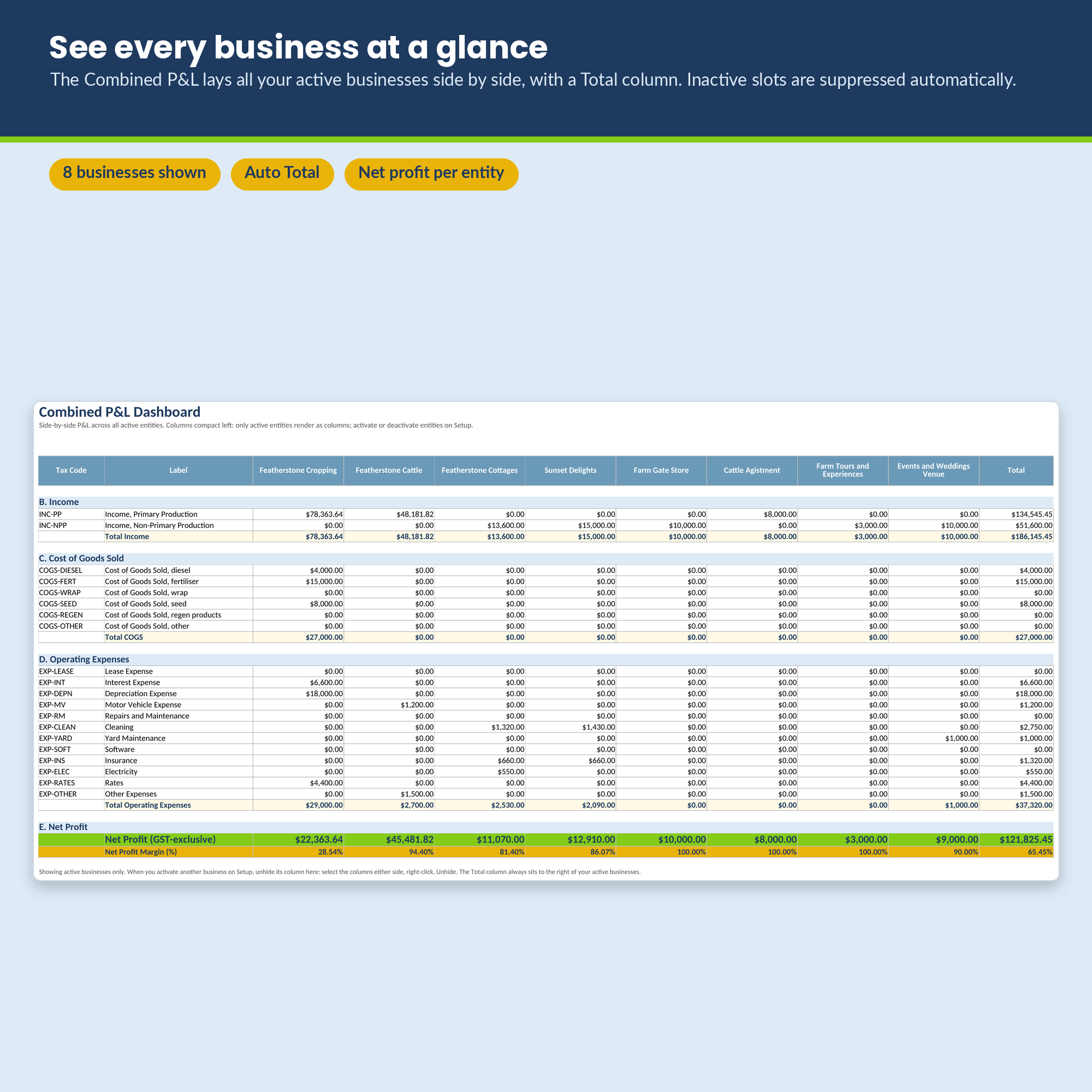
- ✓The Combined P&L now shows every active business automatically, with no manual column work, and its net-profit chart tracks your active businesses on its own.
- ✓Re-confirmed error-free across a full recalculation with multi-entity sample data.
60 second tour
See the workbook in action
A look inside
Real screens, real numbers
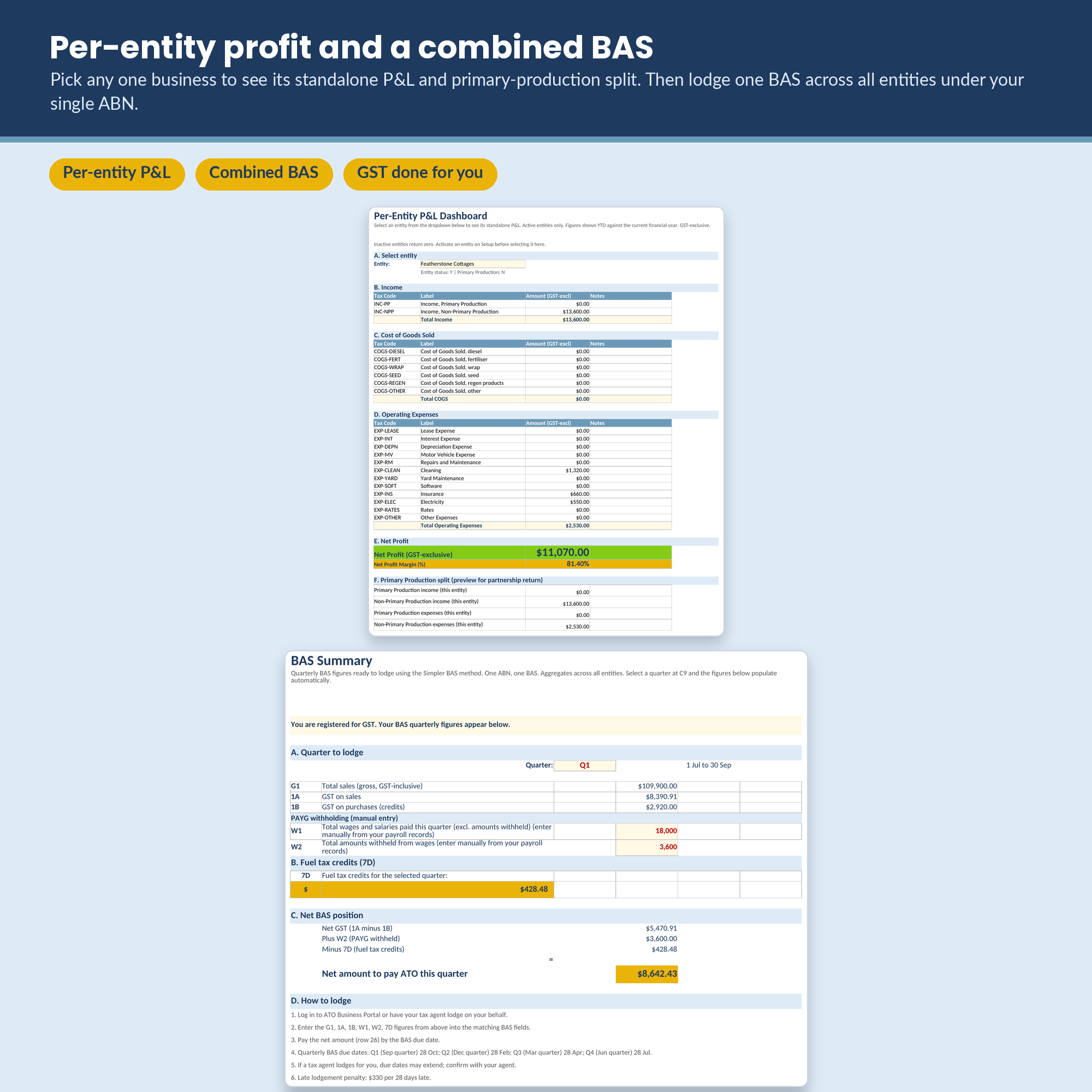
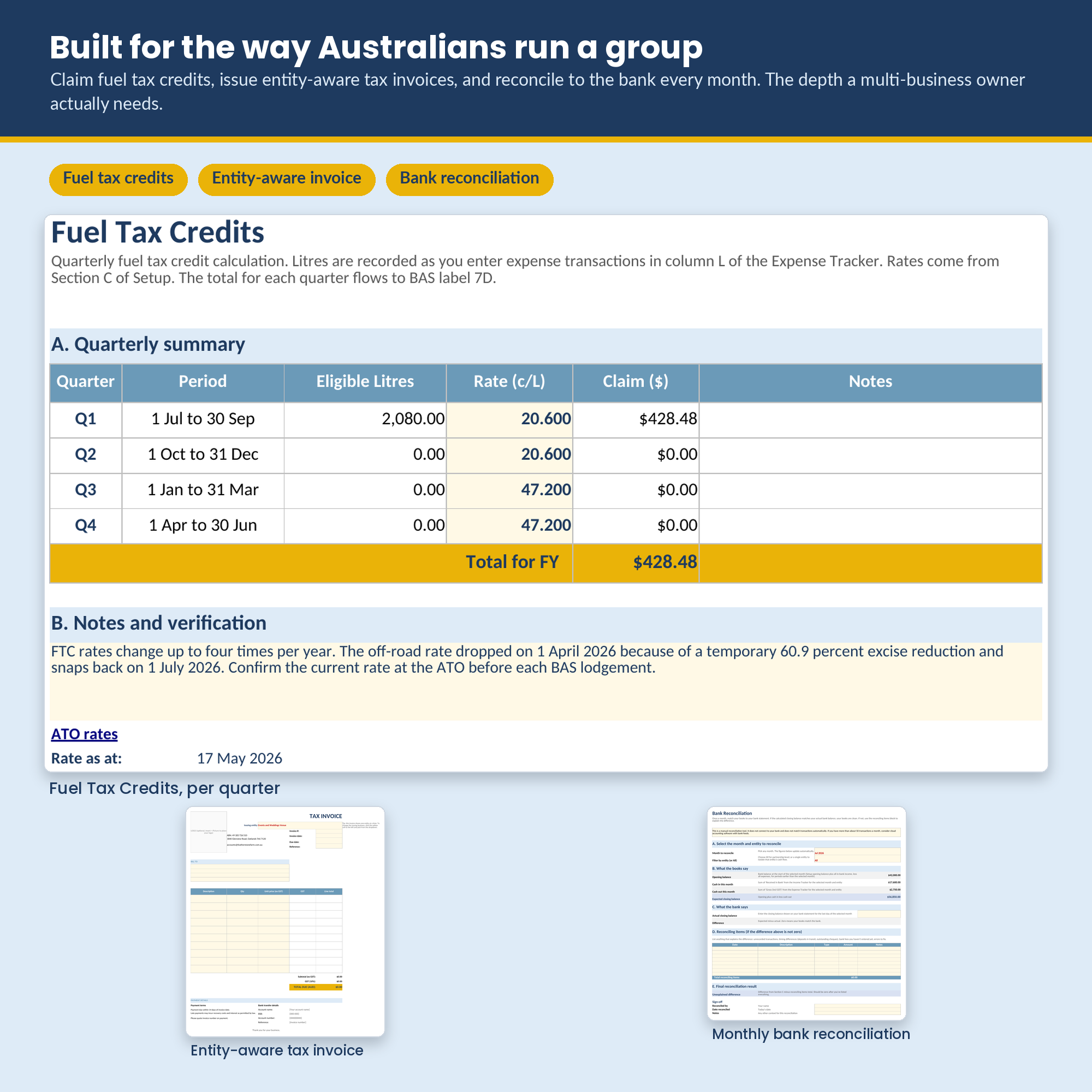
Every figure shown is computed live from the Featherstone Family Farm demo, which runs eight active businesses.
What you get
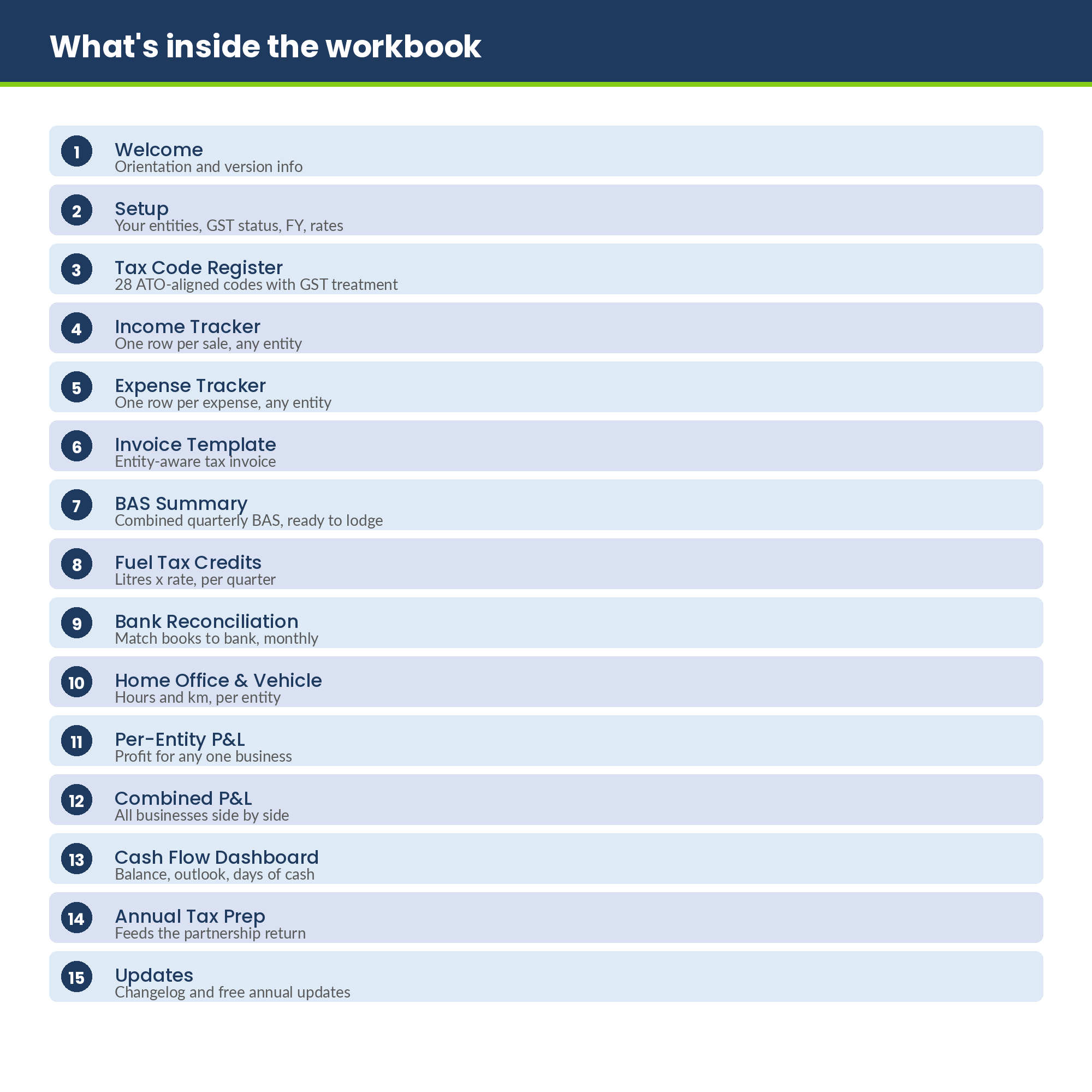
The 15 connected tabs
Welcome and orientation
Start here, with the free annual update signup.
Setup
Your entities, GST status, financial year and fuel tax credit rates.
Tax Code Register
31 ATO-aligned codes, including contractors with and without GST and superannuation, each with its GST treatment and primary production flag. Add your own codes and they flow through automatically.
Income Tracker
One row per sale, tagged to any entity.
Expense Tracker
One row per expense, tagged to any entity.
Invoice Template
An entity-aware tax invoice; pick which business is issuing.
BAS Summary
Combined BAS across all entities (G1, 1A, 1B, W1, W2, 7D), in both quarterly (Q1 to Q4) and whole-of-year Annual modes.
Fuel Tax Credits
A dated rate table applies the correct ATO rate to each diesel purchase by its date, so a mid-quarter rate change is handled automatically. Per-transaction claims feed BAS label 7D.
Bank Reconciliation
Match books to bank monthly, with an audit trail.
Home Office and Vehicle
Hours and kilometres, per entity.
Per-Entity P&L Dashboard
Profit for any one business, with the primary production split.
Combined P&L Dashboard
Every active business side by side, with a Total column. It updates automatically as you activate businesses, with no manual steps, and its net-profit chart auto-tracks them.
Cash Flow Dashboard
Running balance, outstanding invoices, days of cash on hand.
Annual Tax Prep Summary
Feeds the partnership return, primary and non-primary production separated.
Updates
Changelog and the free annual update signup.
Who it is for
Built for Australian groups and family businesses
- ✓Family farms running cropping, cattle, agistment, farm-gate sales and on-farm tourism under one ABN
- ✓Family or investment groups with rental income alongside a trade or consulting business
- ✓Partnerships with a primary venture and one or two side businesses
- ✓Anyone who has outgrown a single sole-trader template but does not want a Xero subscription for each entity
The difference
Why this workbook beats the others
One ABN, one BAS, done properly
The workbook aggregates every entity into a single combined BAS, the way the ATO expects when you trade under one ABN. No stitching numbers together by hand.
Activate a business, see it everywhere
Activate a venture on the Setup tab and it appears automatically across the trackers, invoice, BAS, tax prep, per-entity and Combined P&L. The net-profit-by-business chart tracks your active businesses on its own, with no manual steps.
Mid-quarter fuel tax credits
A dated rate table applies the correct ATO rate to each diesel purchase by its purchase date, so a rate change partway through a quarter is handled automatically. Fuel tax credit rates can change several times a year, and each per-transaction claim feeds BAS label 7D.
Quarterly or annual BAS
Lodge quarterly, or switch the BAS Summary to a whole-of-year Annual mode if you are an annual GST lodger. The Annual figures tie back to the four quarters to the cent.
Contractor and super codes, plus your own
Built-in codes for contractors with and without GST and for superannuation, with contractor payments flagged as potentially TPAR-reportable. Add your own codes too and they flow through every dashboard automatically, with an Other or custom codes catch-all so nothing gets stranded.
Primary production handled correctly
Income and deductions are split into primary production and non-primary production per entity, the way the partnership return needs them for the P8 schedule.
GST treatment done right per code
Taxable, GST-free and input-taxed are each handled correctly. Residential rent and short-stay accommodation are treated as input-taxed.
Live formulas, no macros
Everything calculates the moment you open it. No macro warnings, no security prompts, nothing to enable.
How it works
Five simple habits
- 1
Open the Setup tab, name your entities, set your GST status and financial year (about 10 minutes).
- 2
Record income and expenses as they happen, tagging each line to an entity and a tax code.
- 3
Once a month, reconcile the bank and glance at the dashboards.
- 4
Once a quarter, copy the BAS Summary figures into the ATO Business Portal or hand them to your agent.
- 5
Once a year, use the Annual Tax Prep Summary to feed the partnership return.
Technical requirements
- Microsoft Excel 2016 or newer (Windows or Mac), or Excel for the web.
- Works on Mac and PC.
- Not optimised for mobile data entry; use a desktop for accuracy.
What this product is not
- Not tax advice. We provide a record-keeping tool. Verify your obligations with the ATO or a registered tax agent.
- Not a replacement for Xero, MYOB or QuickBooks at high transaction volumes or where you need live bank feeds.
- Built for several businesses under one ABN. If each entity has its own ABN and lodges its own BAS, this combined design is not the right tool.
Questions
Frequently asked
How many businesses can I track?
Up to 10 entities under one ABN. You name them on the Setup tab and flag which are active. Inactive slots are hidden from the dashboards, so the views stay clean if you run fewer than 10.
We lodge one BAS for the whole group. Does this match that?
Yes. This product is built for several businesses trading under a single ABN with one combined BAS. If each business has its own separate ABN and lodges separately, this combined design is not the right fit.
Does it handle Airbnb or residential rent correctly?
Yes. Short-stay accommodation and residential rent are treated as input-taxed: no GST is added to that income, and no GST credit is claimed on the related expenses. The tax codes do this for you.
Does it separate primary production?
Yes. Every income and expense line carries a primary production flag, and the Annual Tax Prep Summary separates primary from non-primary production for the partnership return.
Does it handle a fuel tax credit rate change partway through a quarter?
Yes. A dated rate table applies the correct ATO rate to each diesel purchase by its date, so a rate change mid-quarter is applied automatically, per transaction. Fuel tax credit rates can change several times a year, and the claim feeds BAS label 7D.
Can I add my own tax codes?
Yes. The tax codes are fully extensible. Add your own and they flow through every dashboard and report automatically, with an Other or custom codes catch-all so nothing you add gets stranded. It also ships with contractor (with and without GST) and superannuation codes, and flags contractor payments as potentially TPAR-reportable.
Can I lodge an annual BAS instead of quarterly?
Yes. The BAS Summary supports both quarterly (Q1 to Q4) and a whole-of-year Annual mode for annual GST lodgers.
Will this work in Excel and Google Sheets?
It is built and tested for Microsoft Excel 2016 or newer, Windows or Mac, and Excel for the web. It uses INDEX and MATCH rather than newer functions, so older Excel is supported. It will open in Google Sheets, though Excel is the tested and recommended environment.
Are there macros?
No. Everything is live formulas, so it calculates the moment you open it. No macro warnings and nothing to enable.
I only run one business. Should I buy this?
Probably not. The Sole Trader edition is simpler and cheaper and is a separate product. Buy Multi-Entity when you have two or more businesses under one ABN.
One ABN. One BAS. Up to 10 businesses.
A one-off purchase of $89 inc GST. Instant download, with your free ATO rate update every July.